Auto-Download
Toggle it on. Outbreak scans for missing games, downloads them from Internet Archive, and updates your library in real-time. No manual ROM hunting.
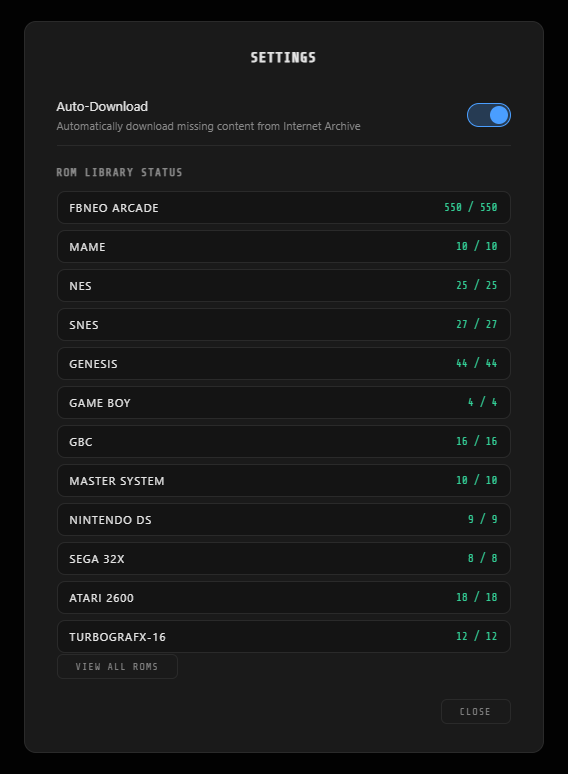
One Toggle
Flip Auto-Download on in the settings panel. Outbreak immediately scans your library, identifies what's missing, and starts downloading. Flip it off to stop.
Live Progress
Watch your ROM counts tick up in real-time as games land. A per-system percentage badge shows exactly which system is downloading and how far along it is.
Smart Sources
Games are pulled from Internet Archive collections. Outbreak picks the right ROM format, verifies file integrity, and handles extraction automatically. FBNeo arcade ROMs come from a verified pack; console games download individually.
Space Aware
Checks available disk space before every download. If your drive is getting full, it stops gracefully and warns you instead of filling the disk.
How It Works
Scan — Outbreak reads your game library against its canonical list of multiplayer-verified titles. Any missing or corrupt files are flagged.
Download — Missing games are fetched from Internet Archive. Large collections (like FBNeo arcade) come as a single optimized pack. Console games download one at a time.
Verify — Every downloaded file is checked for size and integrity. Files that are too small or corrupted are discarded and retried.
Update — Your game library refreshes automatically. New games appear in the Outbreak Host carousel and are immediately available for hosting.
Supported Systems
Auto-Download runs at boot and whenever the toggle is switched on. It respects your network — downloads happen in the background with no impact on active gameplay sessions. All games are sourced from publicly available Internet Archive collections.